
Catalogue 02 · Documents & decisions
Policywright
Twenty-five questions your policy should answer. Yes, no, or “look at this one” — and the clause behind each answer.
- US$3.99 one-time
- Free: 1 policy
- Needs your Perplexity key
- macOS 12+ · universal
- Version 1.0.0
- English & 简体中文
SHA-256 bacf076ed2ea8458595061b439bd5f919440d052cc10aec95997819b8da4a902 · signed with a Developer ID certificate · checksums
Bring your own key. The judgement comes from Perplexity's
pplx-decider-v1.3 model, called with a Perplexity API key that you create and pay for
directly. One policy is about 6,000 input tokens — roughly $0.0002 at Perplexity's published
price. The licence buys the app; the model calls are yours.
Why this is in the catalogue
Every app here has to pass the same five rules. Here is how Policywright passes the first two.
The joke
“Did anyone actually read this policy?” — asked of a 40-page PDF whose answer is a number between 0 and 1.
The work
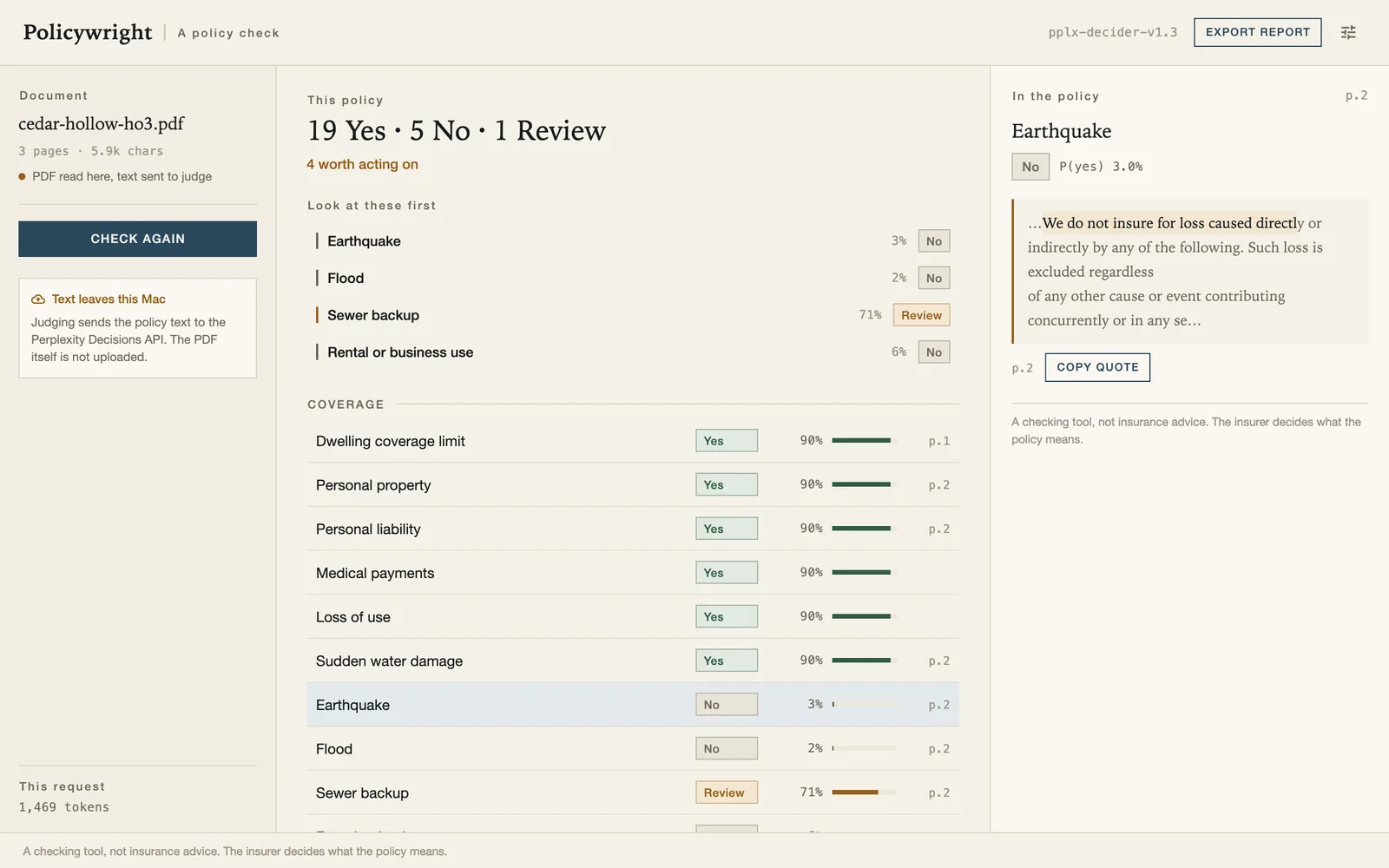
The app asks a decision model, not a chat model. Each check is a yes/no question with a written definition of what “yes” and “no” mean; the model returns a calibrated probability, and the app turns it into one of three answers. Where the model can also point at the sentence it read, the sentence and its page are shown and can be checked in the PDF yourself.
25 checks, five groups
A homeowners policy (HO-3). The list is fixed, written once, and shipped with the app — not a prompt you have to invent.
| Group | Checks |
|---|---|
| Coverage | Dwelling limit, personal property, personal liability, medical payments, loss of use, sudden water damage, earthquake, flood, sewer backup, rental or business use. |
| Exclusions | Business use, intentional or illegal acts, pets, mold, wear and maintenance. |
| Deductible & limits | Deductible, replacement cost versus actual cash value, special limits for jewellery and cash, liability limit. |
| Duties & claims | How soon a loss must be reported, the proof-of-loss deadline, the duty to protect the property. |
| Renewal | Automatic renewal, cancellation notice, premium due date and lapse. |
| Answer | When | What to do |
|---|---|---|
| Yes | P(yes) is at least 0.75. | Treat it as present. The clause, when quoted, is the receipt. |
| No | P(yes) is at most 0.25. | Look at it yourself — a “no” on earthquake cover is a gap worth knowing about. |
| Review | Anything between 0.25 and 0.75. | The model is not sure. This is not a failure; it is the app telling you where to read. |
A quote, or nothing
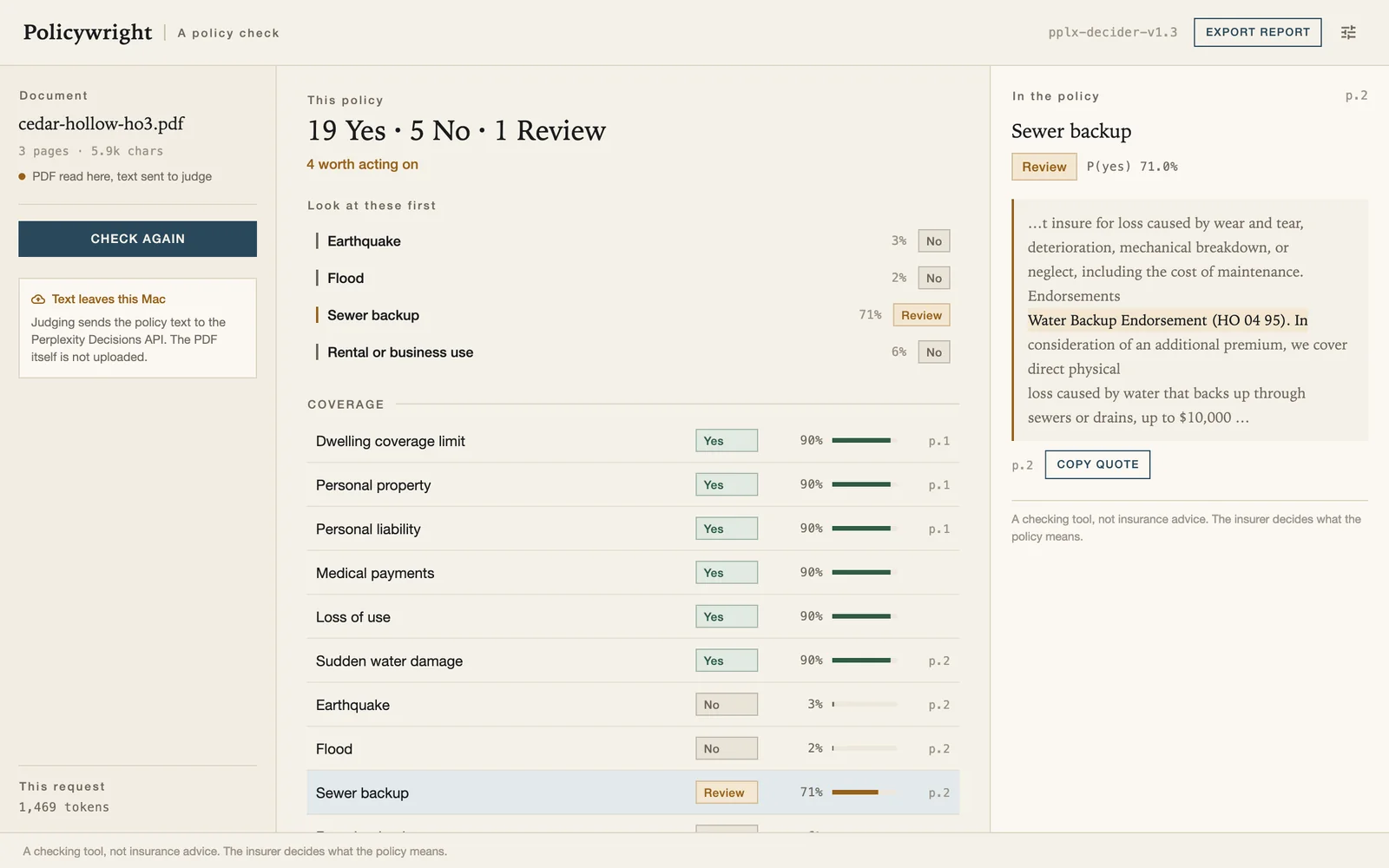
Every quoted sentence is checked against the document before it is shown.
The model returns a span of characters for each check that asks for one. Policywright converts those offsets, cuts the text out of the PDF's own page, and compares it with what the model said it read. If the two do not match, the quote is dropped and the check is marked quote could not be verified — the app never guesses a page number or shows a paraphrase as if it were the policy.
The pane also keeps the page number, so the printed policy is always one glance away.
What it will not do
Said plainly, because an app that reads insurance documents should be careful about what it claims.
It is not insurance advice
Policywright reports what the document says and how sure the model is. Whether a gap matters for your house is a conversation with a broker, not an app.
It does not compare or recommend
No quotes, no “switch and save”, no affiliate links. It reads the policy you already have.
It does not replace reading it
Its job is to tell you which two pages of forty are worth your evening. The twenty “yes” answers are there so you can stop worrying about them.
It only knows HO-3
Homeowners special form. Auto, life, commercial and umbrella policies are not covered by the 25 checks; running one will mostly produce “no” and “review”.
One policy free, then US$3.99 once
The free count is one policy. The bundled sample does not count against it.
| Edition | What you get | Price |
|---|---|---|
| Free | Checks one policy, all 25 checks, the full table, the quotes and the pane. Exporting the report and checking a second policy need a licence. The sample policy is always free. | US$0 |
| Licensed | Unlimited policies, report export, and the policywright command line. One key,
no expiry, verified offline. |
US$3.99 once |
Buy a licence — US$3.99, once
Checkout runs at Paddle in your browser. Paddle takes the payment and VAT, then emails a licence key; paste it into Settings → License and press Activate. The key is Ed25519-signed and checked on your Mac, works on all of your own computers, and includes all 1.x updates. Every purchase carries a 14-day money-back guarantee.
Also a command line
Same engine, same checks, same licence — no window, no Flutter runtime.
The tool ships inside the app bundle. Give it a Perplexity key in the environment and it prints the report as Markdown, or as JSON with fixed fields.
# one policy, Markdown on stdout
PPLX_API_KEY=pplx-… /Applications/Policywright.app/Contents/Helpers/policywright \
  check ~/Documents/policy.pdf

# machine-readable, with pages and token usage
PPLX_API_KEY=pplx-… policywright check policy.pdf --json

# what the 25 checks are, one per line
policywright schema list| Code | Meaning |
|---|---|
| 0 | The report was produced. |
| 1 | A runtime error: network, service, unreadable response. |
| 2 | Bad arguments. |
| 3 | A licence is needed (free check used, or exporting). Nothing was sent. |
| 4 | No Perplexity API key. |
| 5 | The PDF could not be read, or the local engine is missing. |
The PDF stays. The text leaves.
Short version: this edition asks a cloud model, so the words in the policy go to Perplexity. The file does not.
Reading happens here. PDFKit pulls the text layer; pages with no text are read with Apple's Vision. Page breaks, highlight offsets and the report are all produced on the Mac.
Judging uses your key. The extracted text is sent from your Mac to
api.perplexity.ai with the API key you entered. Perplexity sees the policy text and your
key; it does not receive the PDF file. Their handling is covered by your agreement with them.
We receive nothing. No account, no analytics, no crash reports, no policy text on our servers. Preferences and the licence key stay in the app's own container.
Two requests of our own: the licence email is sent by Paddle at purchase, and the optional update check can be switched off. Licence verification is offline.
If the text must not leave
Then this edition is the wrong one. The same app is published as a local edition on swordfishsoft.org: the model runs on the Mac, nothing is uploaded — and, because that model has no span locator, the local edition does not quote the policy.
The boring details
Everything here is checkable with tools macOS already has.
| System | macOS 12 Monterey or later · universal (Apple silicon and Intel) |
|---|---|
| Window | 1200 × 750 by default, 980 × 640 minimum, resizable |
| Download | DMG, 24429694 bytes · SHA-256 bacf076ed2ea8458595061b439bd5f919440d052cc10aec95997819b8da4a902 |
| Signature | Apple Developer ID with hardened runtime. Notarisation is pending — until it is stapled, open the app once with right-click → Open. |
| Judging | Perplexity Decisions API, model pplx-decider-v1.3, with your own key |
| Licence | Ed25519 key, verified offline; no server, no device count |
| Interface | English and Simplified Chinese |
| Store | Direct only — not on the Mac App Store, no account required |
Install
- STEP 01Open the DMGDouble-click the file you just downloaded. A window with the app and an Applications shortcut appears.
- STEP 02Drag it acrossDrop Policywright into Applications, then eject the disk image. That is the installation.
- STEP 03Open it onceSigned, so right-click → Open works even if macOS hesitates the first time. Then Settings → API key.
What changed
First release.
-
1.0.0 13 Nov 2026
- 25 checks for HO-3 homeowners policies, in five groups, with the definitions shipped in the app.
- Three answers — yes, no, needs review — with P(yes) and adjustable thresholds.
- Quoted clause and page from
pplx-decider-v1.3; quotes that do not match the document are dropped. - PDF text read locally with PDFKit and Vision; only the text is sent, with your own API key.
- Markdown report export; one free policy; offline Ed25519 licence.
- The
policywrightcommand line with JSON output and fixed exit codes.